


In today’s workplace, IT decision-makers face a persistent challenge: a reactive, ticket-driven approach to workspace management that can’t keep up. What often begins as a minor connectivity or configuration issue can quickly escalate into a larger disruption, pulling teams away from long-term planning and into day-to-day troubleshooting.
Issues often stay hidden until they turn into urgent requests, forcing teams into endless firefighting. Data shows that 58% of professionals are overwhelmed with demands, forced to sort out priorities, and resolve only 85% of their daily tickets1. As a result, strategic initiatives are frequently delayed in favor of keeping systems operational. But what if these obstacles could be identified, and rectified, the moment they emerge?
Consider a common scenario: A firmware update across a large fleet of docking stations encounters unexpected issues, compounded by underlying PC network latency. Without remote debugging, the IT team was trapped in endless email troubleshooting, draining resources, time, and momentum.
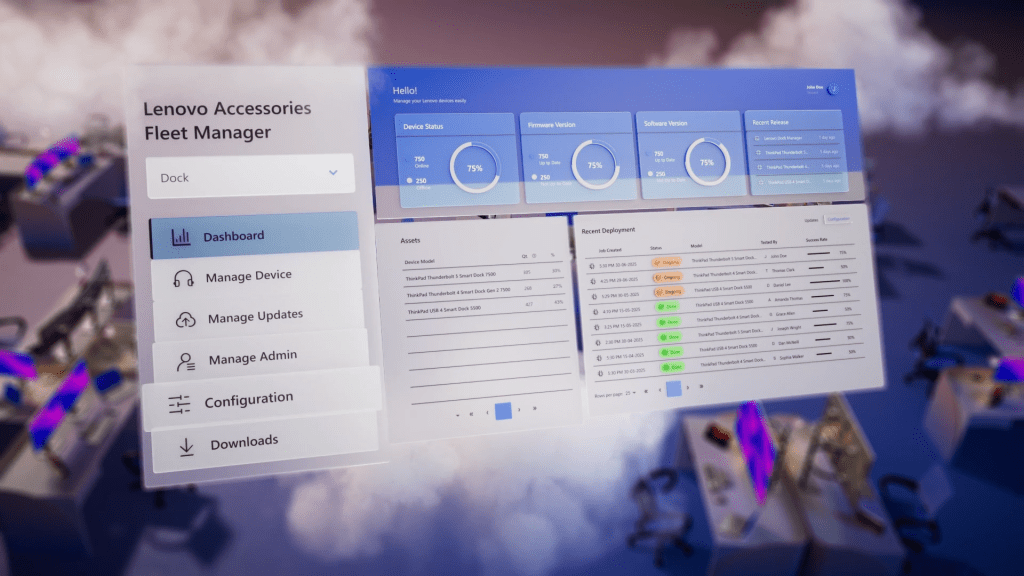
This is where greater visibility and centralized management can make a meaningful difference. Lenovo’s latest Smart Docks offer centralized, real-time intelligence that enables proactive detection and reporting of issues, preventing escalation. Lenovo Accessories Fleet Manager (LAFM), our cloud-based platform, reduces reliance on reactive, ticket-based operations by embedding robust capabilities such as Asset Management, Live Configuration, On-Screen Display, and Live Troubleshooting.
A comprehensive debug log can also be exported from the cloud, offering direct insights into connected PCs and helping IT teams accelerate issue resolution. Rich visualizations across every stage, from provisioning to firmware updates, transform reactive chaos into real-time clarity.
Network security is equally vital in enterprise environments. Integrating Cisco ISE, our Smart Docks extend the corporate network edge, serving as more secure access points that authenticate device identity, health, and privileges in real time. This allows IT teams to uphold strict policies at every connection, safeguarding resources for verified, compliant endpoints only.
We also recognize that real efficiency encompasses both software and hardware. That’s why we’ve integrated upstream cables securely into every dock, eliminating frustrating bottlenecks such as “missing cable” tickets. As organizations hasten their digital transformation, traditional docks fall short of evolving demands. This is why our latest Lenovo Smart Docks deliver up to 120 Gbps2 Thunderbolt 5 bandwidth and support for up to three 8K@60 Hz displays and one 4K@60 Hz3, supporting productivity today and an edge for tomorrow.
Designed with sustainability in mind, these docks are TÜV Carbon Footprint Certified and incorporate up to 90% TÜV-certified post-consumer recycled plastic in the exterior casing. They are also packaged in FSC-certified materials and engineered for improved power efficiency in real-world enterprise environment4.
We’ve also developed a leading-edge ecosystem of Lenovo PCs and accessories that excel when used together. For IT teams standardizing on Lenovo technology, this integrated approach can help reduce complexity, deliver up to 14% power savings5, streamline management, improve operational efficiency, and advance sustainability goals within a unified solution.
Our latest dock portfolio comprises three offerings, each engineered to complement Lenovo PCs, and address different enterprise needs and workflows:
- ThinkPad Thunderbolt 5 Smart Dock 7500 – delivers next-generation speed and intelligent power tailored for Lenovo Mobile Workstations.
- ThinkPad Thunderbolt 4 Smart Dock Gen 2 7500 – features premium display and connectivity technology for demanding developers.
- ThinkPad USB4 Smart Dock 5500 – brings smart, cloud-based management to essential IT operations for elevated everyday control.
At Lenovo, we empower IT teams to evolve from reactive firefighting to strategic foresight. By aligning PCs, docks, and other accessories within a cohesive ecosystem, organizations can simplify operations, improve day-to-day reliability, and free IT teams to focus on work that delivers lasting value.
1 According to a study commissioned by GoTo and conducted by OnePoll.
2 Up to 120 Gbps refers to the ThinkPad Thunderbolt 5 Smart Dock 7500.
3 Up to 8K@60 Hz refers to the ThinkPad Thunderbolt 5 Smart Dock 7500 and the ThinkPad Thunderbolt 4 Smart Dock Gen 2 7500.
4 Based on internal Lenovo testing under specific usage conditions. Actual results may vary depending on configuration and usage.
5 Up to 14% power savings is based on testing with supported monitor models, including ThinkVision P40WD-40, P32UD-40, T27QD-4v, T32UD-40, P24QD-40, T27UD-40, P27QD-40, T27QD-40, P34WD-40, and T34WD-40. Additional models may be supported in the future.